
What we’ve learned running callboards since 2006
Stage managers have more good options today than ever. New tools launch every season, and that’s a good thing: it’s a big field, every company works a little differently, and stage managers deserve software that fits.
We’ve been building VirtualCallboard for nearly twenty years. Here’s what the companies who run their productions on it have taught us about choosing well, whichever tool you pick.

Since 2006
an online callboard for theater
1,900+
organizations have run productions on VirtualCallboard
30,000+
active users
The real choice: move the paperwork, or connect the company
Most searches for stage management software start with a list of documents: the rehearsal report, the daily schedule, the contact sheet, the props list. Plenty of software will take those spreadsheet and word-processor templates and put them in a browser. That helps, but it’s the same work in a new window.
The bigger change is who’s on the other end. A production is dozens or hundreds of people across departments, and the hard part of stage management has never been typing the report. It’s making sure each person gets the right information and acts on it. The software worth choosing brings the whole company onto one shared platform: the cast sees its own calls, designers read the reports meant for them, and you can tell who has seen the note.
So before you compare feature lists, ask a simpler question: will my company actually use this together?
Make sure every change reaches everyone
Theater runs on changes: a rehearsal moves, a fitting is added, a scene is cut at 11 PM. The schedule is only as good as the number of people who see the change before they leave the house.
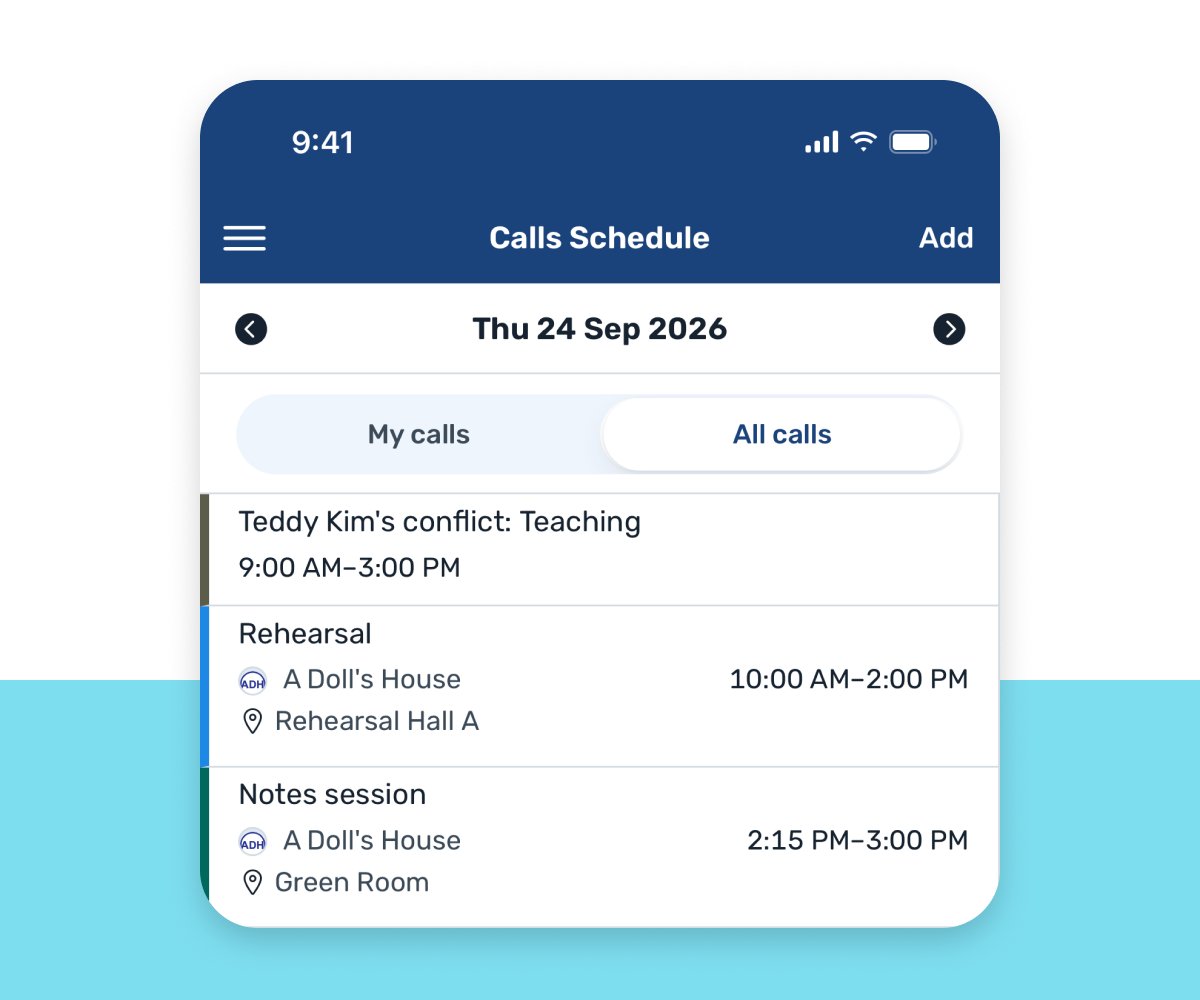
So don’t ask people to remember to check. Look for software that reaches them where they already are: their inbox, a notification on their phone and a text message. VirtualCallboard does all three. New, changed and canceled calls, notes, open calls, conflicts, report comments and shared files go out by email and app notification on iPhone and Android, and by text for people who turn on TXT messaging. Then read tracking tells you who has seen each note.

What to look for in stage management software
Room for the whole company
Every actor, crew member, designer and staff member gets their own login, with no charge per person, and sees what’s relevant to their production.
Notifications that find people
Changes should reach people by email, on their phone and by text, without anyone remembering to check.
A daily call people trust
Calls by group or by person, flags for double-booked people and rooms, and a clean printout for the callboard by the stage door.
Reports that reach the right people
Templates for rehearsal, performance and technical reports, a distribution list for each, and corrections that go out automatically.
Proof the message landed
Read tracking on notes, so “I never got the email” becomes a question you can answer.
Contact details people trust you with
Contact sheets where each person decides what the company sees, with emergency and medical details private to managers.
Room to grow
One show this spring, a full season next year, several venues after that, all from one account.
A vendor you can count on in tech
Your callboard has to work at half hour on opening night. Ask how long the company has been around and who answers the phone.
Match the tool to the job
Theater software has grown into several kinds of tools, and plenty of companies happily use more than one.
Stage management and callboards
Daily calls, reports, notes, contact sheets and communication with the whole company.
Production planning
Budgets, labor, inventory and long-range calendars, often for the production manager.
Venue and space scheduling
Rooms, rentals and events across a building or campus.
Auditions and casting
Sign-ups, callbacks and role offers.
Script and blocking
The prompt book, blocking notation and script changes.
Ticketing and box office
Selling seats and managing patrons.
There’s no single right answer, and most of the people building these tools are theater people solving problems they’ve lived. We’re glad there are so many of them, and we hope they do well. Choose the tool whose center of gravity matches your biggest problem. If that problem is keeping a company of people on the same page, that’s the job VirtualCallboard was built for.
When spreadsheets, group texts and Facebook groups stop working
Nearly every company starts with the tools it already has: a spreadsheet schedule, a shared drive, Google Calendar, a group text or a Facebook group. They’re free and familiar, and they’re fine for a small show. The signs you’ve outgrown them are familiar too: schedule changes that don’t reach everyone, reports buried in email, contact sheets that are out of date the day they’re printed, and production messages lost among everything else. That’s usually when community theaters and school programs move to software built for the job.
“It’s exactly what I’ve been looking for. We’ve used Facebook to organize productions for several years, but it’s led to a lot of issues.”
Artistic director, volunteer-run community theater
Part of how stage management is taught
For nearly twenty years, VirtualCallboard has turned up where stage managers learn the craft: in the textbooks, in the trade press and in student research.
Stage Management
Lawrence Stern and Jill Gold, 12th and 13th editions
The Stage Manager’s Toolkit
Laurie Kincman, 3rd and 4th editions
Stage Management Basics
Roth, Allender-Zivic and McGlaughlin
A Practical Guide to Greener Theatre
Ellen Jones, with a stage manager going paperless on VirtualCallboard
Stage Directions
“Smarter than a Spreadsheet,” a review by stage management educator David J. McGraw
TD&T, USITT
Named among the tools in “Leading the Way in a Post-Pandemic World” (2021)
Student research
Theses and projects at Texas A&M, the University of Alberta, Rollins College and WPI
Questions to ask any vendor
Whatever you’re considering, including us, these questions separate a good demo from a good season:
- How long have you been running, and how many organizations rely on you?
- Do you charge per user, or can the whole company join?
- How do changes reach people: email, app notifications, text messages?
- Will the cast and crew need training, or can they just log in?
- What happens to our productions after closing, and can we export our data?
- How do you protect personal and emergency contact information?
- Who do we talk to when something goes wrong in tech week?
Try it on one real production
A demo shows you features. A production shows you whether people use them. Pick an upcoming show, invite the whole company rather than only the stage management team, and run real calls and reports through it for a couple of weeks. Then ask yourself: did people check it without being reminded? Did the right reports reach the right people? Did you spend less time chasing?
Where VirtualCallboard fits
VirtualCallboard has been an online callboard for theater since 2006. More than 1,900 organizations have run productions on it, and more than 30,000 people use it today. It’s built around communication: daily calls with conflict flags, notifications by email, app and text, report templates with distribution lists, notes with read tracking, contact sheets where each person controls their own details, and file sharing and discussions. Every plan includes unlimited users, so the whole company is on the same callboard.
See VirtualCallboard for stage managers, every feature or plans and pricing.
Questions
What is the best stage management software?
The one your whole company will actually use. Look for unlimited users, notifications by email, app and text, report templates with distribution lists, read tracking on notes, privacy controls for contact details and a vendor with a long track record. Then try it on a real production before you commit.
Is there free stage management software?
Several tools offer free plans or free trials, usually with limits on productions or users. VirtualCallboard’s paid plans start with a 30-day free trial, and its free Archive plan keeps your past productions’ records online.
What’s the difference between stage management software and production management software?
Stage management software is for running rehearsals and performances: daily calls, rehearsal and performance reports, notes and contact sheets. Production management software leans toward planning across shows, with budgets, labor, inventory, venues and calendars. Some tools cover parts of both.
How does VirtualCallboard notify the cast and crew?
By email and by app notification on iPhone and Android, and by text message for people who turn on the TXT messaging add-on. New, changed and canceled calls, notes, open calls, conflicts, report comments and shared files can all send a notification, and read tracking shows who has seen each note.
Can I keep using spreadsheets and Google Calendar?
For a small show, they work. As the company grows, the cost shows up in schedule changes that don’t reach everyone and documents scattered across files and email threads. Stage management software keeps calls, reports, notes and contacts in one place the whole company shares.
Should stage management software charge per user?
Per-user pricing adds up fast on a production, because everyone in the company needs access. VirtualCallboard includes unlimited users on every plan and prices by the number of active productions.
Will my cast and crew need to install an app?
Not for VirtualCallboard. It works in any web browser, and iPhone and Android apps are there for people who want them.
Try it on your next production
Every paid plan starts with a 30-day free trial. Invite the whole company and see who checks the callboard.