
VirtualCallboard feature
Know who made the call
Ten minutes past the call and two people aren’t here. Was it excused? Is it the third time? VirtualCallboard keeps attendance with the call itself, so you can mark it in a minute and look it up months later.
Trusted by theaters, schools and arts organizations since 2006.
How it works
1. Print the roll
Open the call and click Print Roll for a sign-in sheet listing everyone called.
2. Mark attendance
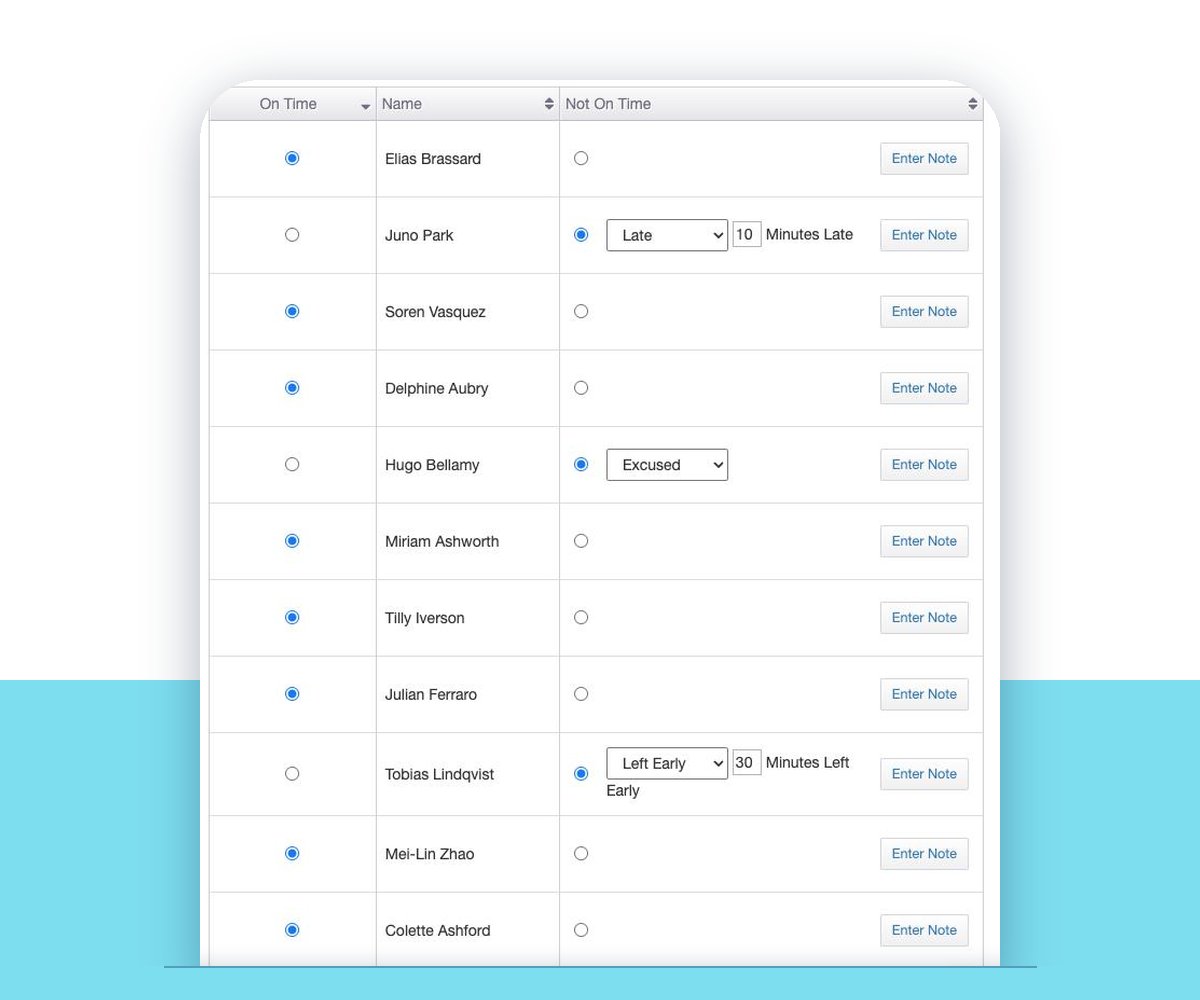
From 15 minutes before the call, click Enter Attendance and mark each person On Time or Not On Time.
3. See the record
Everyone sees their own attendance, and managers see every call that still needs it entered.
More than present or absent
For anyone who isn’t on time, choose Unexcused, Excused, Late or Left Early, with the minutes for late arrivals and early departures. Add a note beside a name when there’s more to the story.
Attendance belongs to the call, so it’s there for every rehearsal, fitting and work call you’ve put on the rehearsal schedule. If you made a mistake, Edit Attendance fixes it later.
Everyone can see their own record
Under Schedule › Attendance, each person sees their own record in My Attendance. Nobody has to ask the stage manager how many calls they’ve missed.
Managers get the Attendance Administration tab, which lists Calls with Unentered Attendance, each with its own Enter Attendance button, so nothing slips through after a long tech day.
Hours for crews and volunteers
Run an hours report for any group of people and any week. You get a row per person with their hours for each day and a total. On-time calls count in full, and late arrivals count minus the minutes they were late.
It works for volunteer shifts too. Give each area its own call type, like Volunteer – Scenery and Volunteer – Costumes, schedule the shifts as calls, and total the hours by area at the end of the season.
Good to know
Who can take it
Roles decide who enters attendance, and a role can be limited to fittings.
Busy calls with a time
Attendance is taken on calls marked Busy with a set time, not on Free or Time TBD calls.
Notes per person
Add a note beside anyone’s name to record why they were late or excused.
Volunteer hours
Schedule volunteer shifts as calls and total the hours by area or across every show.
Questions
Who takes attendance?
The stage manager, or anyone whose role allows it. For a sheet people sign in person, print the roll for the call.
Can I tell excused absences from unexcused ones?
Yes. Anyone not on time is marked Unexcused, Excused, Late or Left Early, with minutes for Late and Left Early and an optional note.
Can people see their own attendance?
Yes. Everyone sees their own record under My Attendance, so there are no surprises at the end of the run.
Can VirtualCallboard total volunteer or crew hours?
Yes. The hours report totals each person’s hours by day for the dates you choose. Absences and early departures aren’t counted, so set short shifts to the hours actually worked.
When can I enter attendance?
From 15 minutes before the call starts, and any time after. Calls still waiting for attendance are listed for managers.
VirtualCallboard is also built for stage managers, schools and community theaters.
More VirtualCallboard features
Theater Scheduling Software
Build calls by person or group, catch double-bookings and send everyone their own schedule.
Rehearsal and Performance Report Templates
Your own report templates for rehearsals, performances and tech, sent to the right people every time.
Cast & Crew Conflict Calendar
Cast and crew enter their conflicts once, and you see them before you call anyone.
Try it free for 30 days
Set up your next production in minutes, with unlimited users. See every feature or compare plans.