
VirtualCallboard feature
Talk it through without the reply-all
Some questions need a conversation, not a note: the quick-change in Act II, the prop that keeps breaking, the load-in plan. A VirtualCallboard discussion keeps every reply and every file in one thread, open only to the people you add.
Trusted by theaters, schools and arts organizations since 2006.
How it works
1. Start a thread
Pick a production, give it a subject, and choose people or whole groups, like a department.
2. Attach what they need
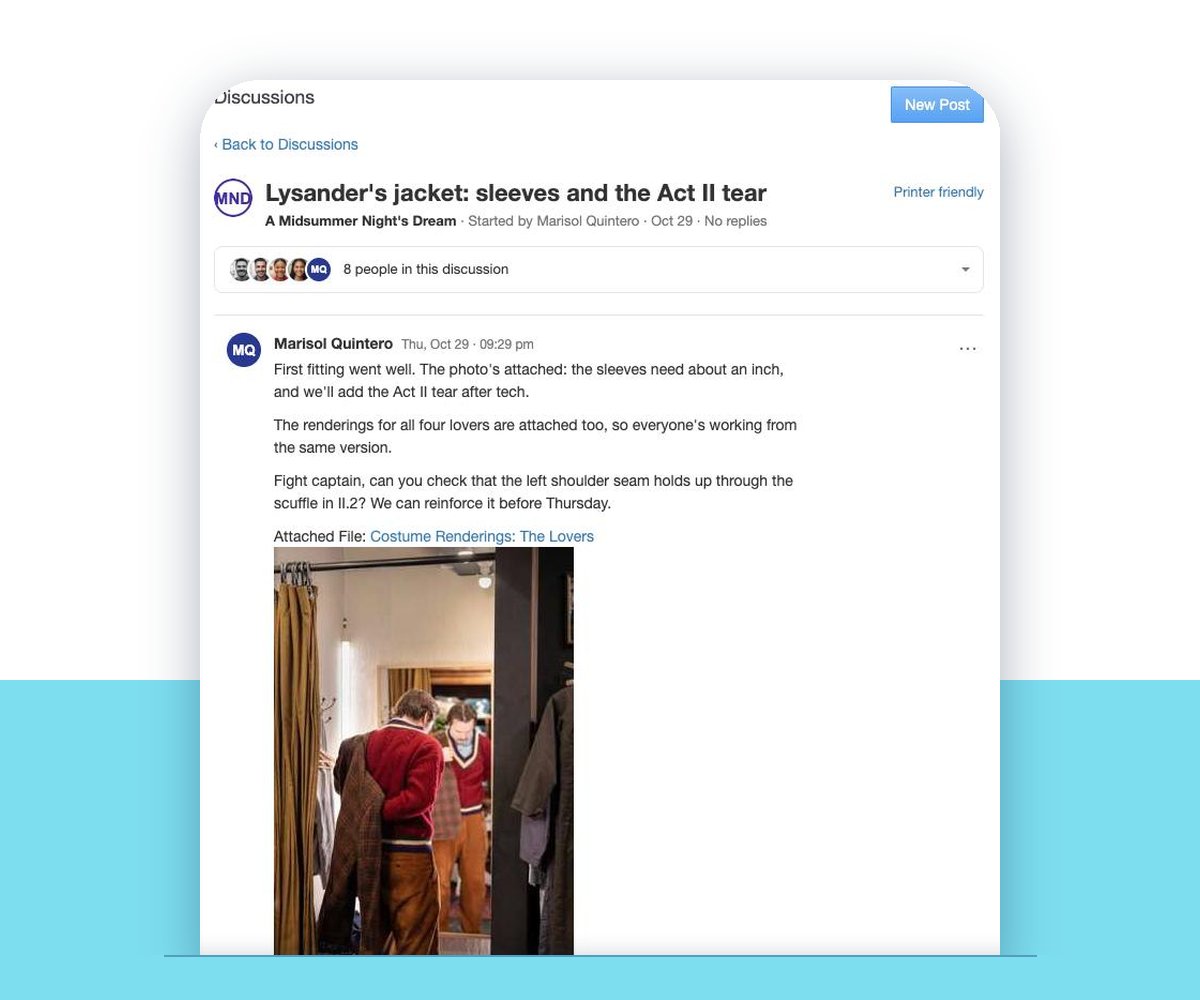
Add files you’ve already shared, or upload new ones. Photos show right in the post.
3. Everyone replies in one place
Replies stay together under the first post, and everyone else in the thread can be told about each one.
The whole conversation, in one place
Add the people who need to weigh in, or whole groups at once. Only the people in a discussion can see it. Add someone halfway through and they can read the whole thread, including everything posted before they joined, so nobody has to forward the backstory.
When you change who’s in a group, they gain or lose its discussions too. You decide each time whether a post or reply sends a notification by email, app and, with the TXT messaging add-on, text. Your site can start that box ticked.
Files and photos right in the thread
Attach files from your production’s shared files, or upload a new one while you write. Attachments show up as links in the post, and images appear right in it, so the swatch, the sketch or the photo of the broken hinge sits next to the conversation about it.
You can also paste in a YouTube or Vimeo link, and the video plays in the post.
Good to know
Private to the thread
Only the people in a discussion can see it. Administrators aren’t included unless you add them.
Late joiners catch up
Anyone you add later can read the whole thread from the start.
You choose who’s told
Tick the notification box on a post or reply, or leave it quiet.
Reply in the thread
A reply to a notification email goes only to the sender, so ask people to answer in the discussion.
Questions
Can people added to a discussion see earlier posts?
Yes. Anyone you add can read the whole thread, including posts made before they joined.
Who can start a discussion?
Anyone whose role lets them add posts. A role can also be set to reply only, so someone can join in without starting new threads.
Can people reply by email?
A reply to a discussion email goes only to the person who posted, not into the thread. To keep the whole group in the loop, reply in VirtualCallboard.
How big can attachments be?
Each uploaded file can be up to 50 MB, and images show right in the post.
Is everyone notified about every reply?
Only when the person replying ticks the notification box. Then everyone in the discussion is told, except the person who wrote it.
VirtualCallboard is also built for stage managers, production managers and dance and music companies.
More VirtualCallboard features
Notes for Cast & Crew
Send notes to people or groups by email, app and text, the way each person chooses.
File Sharing for Theater Productions
Share scripts, designs and tracks with a production or a department, organized in folders.
Company & Production Announcements
Post to one show or the whole company, and set the date it comes down.
Try it free for 30 days
Set up your next production in minutes, with unlimited users. See every feature or compare plans.